9 min read
EXPLAINER / Live Sound
What Is Live Sound?
Live sound is the process of capturing or receiving audio sources, controlling and mixing their signals, routing them where they need to go, and reproducing them during a live performance or event. It connects microphones, direct inputs, mixing systems, performer monitoring and the PA so performers can hear what they need and the audience hears the intended programme.
On this page ↓
A beginner’s guide to live sound as a connected system: how voices, instruments and playback are captured or connected, controlled and mixed, then routed to performer monitoring and the audience PA.
In Brief
Live sound is not one loudspeaker, one mixing console or one engineer.
It is a connected system and workflow.
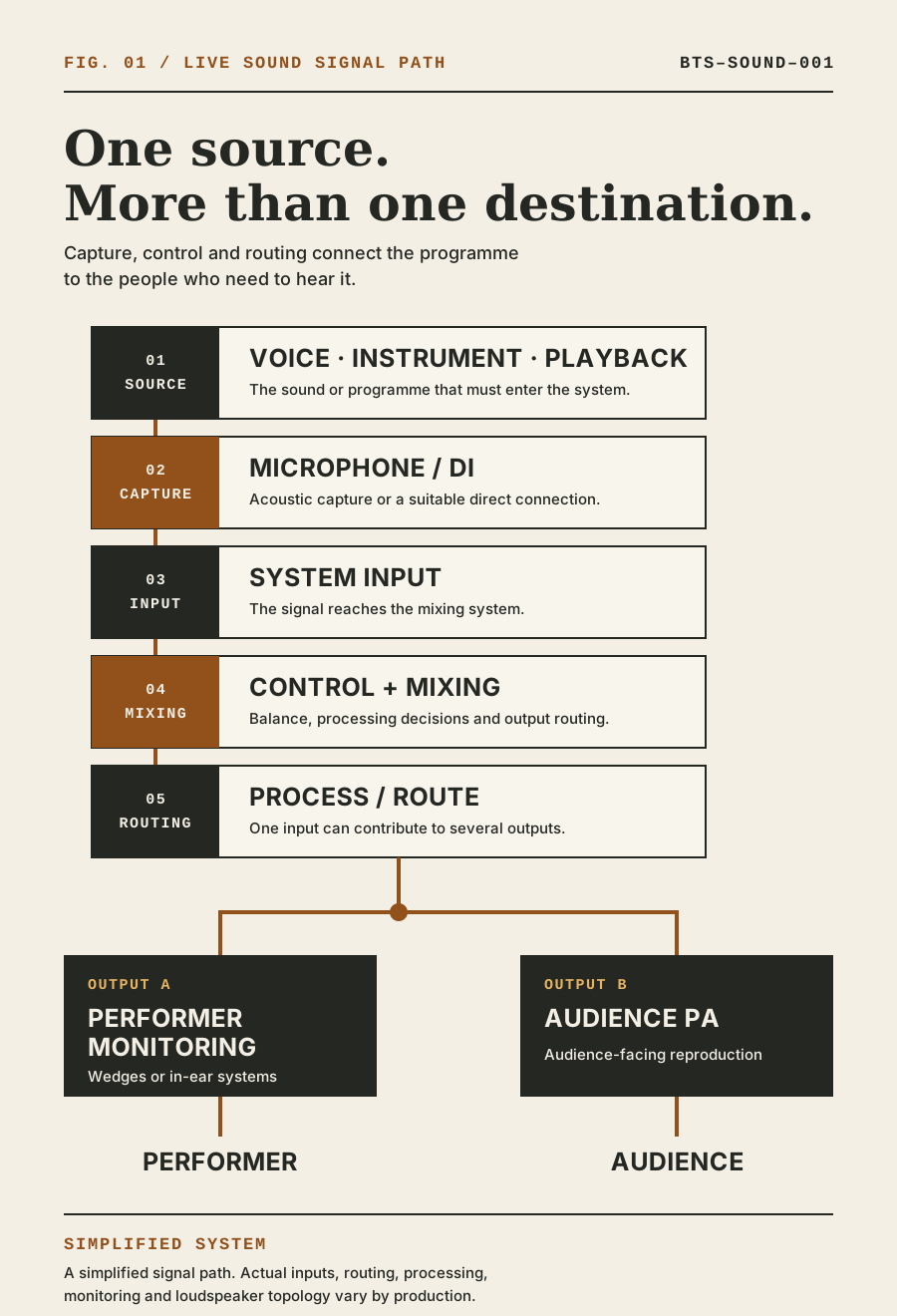
A voice, instrument, playback device or other sound source first has to enter the audio system. A microphone may capture it acoustically. A DI or another suitable connection may take it directly. The resulting signal reaches a mixing system, where it can be controlled, combined and routed.
From there, audio may travel in more than one direction.
One mix may feed the PA for the audience. Separate mixes may feed stage monitors or in-ear systems for performers. Other outputs may serve recording, broadcast, streaming or assisted-listening requirements where the production includes them.
The exact equipment and routing vary. The underlying task remains the same: move the required audio from its sources to the people who need to hear it, with appropriate control at each stage.
Live Sound Is a System, Not a Speaker
It is common to describe a venue as having “sound” because loudspeakers are installed.
Loudspeakers are only the final audible part of a much larger path.
Before the audience hears a presenter or performer, the production may need to establish:
- which sources must enter the system;
- how each source will be captured or connected;
- where those signals travel;
- how they will be controlled and mixed;
- what performers need to hear;
- what the audience needs to hear;
- how the system will cover the audience area;
- who will operate each part of the system;
- what must be checked before the event begins.
A collection of capable products does not automatically become a suitable live-sound system. The inputs, outputs, routing, operation, venue and programme have to work together.
It Starts With a Sound Source
Every signal path begins with something the production needs to hear.
That source might be:
- a person speaking or singing;
- an acoustic instrument;
- an instrument amplifier;
- a keyboard or electronic instrument;
- a playback computer;
- a DJ system;
- a remote participant;
- a video or presentation with audio;
- a communications or announcement source.
The source matters because different sources enter the system in different ways.
A singer’s voice may be captured by a microphone. A guitar amplifier may be captured by a microphone placed near its loudspeaker. A keyboard may connect through a DI. A playback system may provide one or more direct audio outputs.
The first question is therefore not:
Which mixing console should we use?
It is:
What sources need to be heard, by whom and where?
Microphones and Direct Inputs
A microphone converts acoustic sound into an electrical signal that can be amplified, processed, routed or recorded.
Microphone choice and placement affect what enters the system. A microphone cannot know which sounds the production intended to capture. It responds to the sound reaching it, including wanted sources, nearby stage sound and room reflections.
Some sources enter the system without being captured acoustically.
A DI, or direct box, is commonly used to interface instruments such as keyboards, acoustic guitars and basses with a professional audio system. A typical DI application converts an unbalanced, high-impedance instrument signal into a balanced, low-impedance signal suitable for connection to the audio system.
Microphones and DIs perform different jobs, but both can create inputs that the mixing system receives and controls.
When reviewing a technical rider, the production should also check its input list. An input list may identify vocals, instruments, playback channels, microphone or DI requirements and other information needed to prepare the audio system.
The Signal Reaches the Mixing Console
Each microphone, DI or direct source reaches an input in the mixing system.
The physical path may include stage boxes, analogue multicore, digital audio networks, interfaces or other infrastructure. A simple production may place the mixer close to the stage. A larger production may distribute inputs and outputs across several locations.
The mixing console provides a point from which inputs can be controlled, combined and routed to the required outputs.
That does not mean every signal follows one fixed path. A single input may feed the audience mix, one or more performer mixes, a recording feed or another destination. Different outputs may require different balances and processing.
What the Mix Engineer Controls
The engineer is not simply turning sources up and down.
Depending on the system and production, the mixing workflow may include:
- setting input gain;
- balancing sources;
- muting sources when they are not required;
- shaping tonal balance with equalization;
- controlling dynamics;
- applying effects where appropriate;
- assigning signals to groups, buses and outputs;
- creating monitor mixes;
- following cues and programme changes;
- responding when performers, content or stage conditions change.
The objective is not to use every available control. It is to make deliberate decisions about what should be heard, where it should be heard and how the different sources should work together.
The Audience Mix
The audience-facing mix is commonly controlled from the front-of-house, or FOH, position.
Inputs are balanced for the programme and routed toward the audience sound system. The signal may pass through system processing, amplification and different loudspeaker elements before reaching listeners.
The PA is the audience-reproduction part of the system. Depending on the event and venue, it may include main loudspeakers, subwoofers, front fills, delay loudspeakers or other elements used to provide appropriate coverage.
The mix and the loudspeaker system solve related but different problems.
The mix engineer controls the programme balance and responds to what is happening on stage. System design, alignment and optimization address how that mix is reproduced across the audience area. On some productions these responsibilities belong to different people; on others one person may cover both.
Good sound at the mixing position is not enough if important parts of the audience cannot hear clearly.
What Performers Hear
Performers often need a different mix from the audience.
A vocalist may need to hear their own voice clearly. A drummer may need more bass and keyboard. A presenter may need a return from a remote participant. Different performers can require different balances.
Those mixes can be routed to stage-monitor loudspeakers, often called wedges, or to in-ear monitoring systems. They may be created from the same console as the audience mix or from a separate monitor console.
Monitoring is not simply a copy of the PA mix pointed back at the stage. It is a set of working mixes designed around what performers need in order to deliver the programme.
The audience and performers therefore hear different outputs created from many of the same inputs.
FOH and Monitor Positions
FOH can describe both a physical position in the audience area and the audience-mixing function carried out there.
Placing the FOH engineer within the audience area can provide a useful listening position for audience-facing mix decisions, where the production and venue permit it. The exact location still involves practical constraints such as room layout, sightlines, cable or network routes and audience use of the space.
The monitor position, where a separate one exists, is commonly located at the side of the stage. The monitor engineer works closely with performers and stage inputs, creating the mixes they hear.
Not every event needs two consoles or two engineers. A small system may create audience and monitor mixes from one console. A larger performance may separate the roles because of the number of inputs, outputs, performers and changes involved.
These are production decisions, not fixed rules.
Where Live Sound Meets Backline
Backline and live sound meet on stage, but they are not the same system.
Backline is what musicians perform with. Live sound captures, controls, monitors and reproduces that performance.
A guitarist may perform through a guitar amplifier. That amplifier is backline. A microphone placed in front of it begins an audio path through the sound system.
A keyboard is backline. A DI connecting it to the mixing system normally belongs to the audio signal chain.
The boundary can vary according to the artist, supplier scope and production agreement. The important operational question is not only which category an item belongs to, but who is responsible for supplying, preparing, connecting and supporting it.
The complete distinction is explained in Backline vs Sound: What’s the Difference?.
Soundcheck
Soundcheck is where performers and programme sources enter the prepared audio system before the show.
Depending on the production, the team may use that time to:
- confirm that required inputs are present and correctly routed;
- establish workable input levels;
- build or refine performer mixes;
- balance the audience mix;
- listen for interactions between stage sound, microphones, loudspeakers and the room;
- check playback and other programme audio;
- confirm cues, handovers and communication;
- identify problems while there is still time to resolve them.
Soundcheck is not only a test of whether audio passes from an input to an output. It is a test of whether the system works with the performers, programme and venue that will use it.
It should not become the first time the team discovers an incomplete input list, an unresolved rider requirement or a missing responsibility. Those questions belong in the production advance wherever possible.
Why the Room Matters
The sound system operates inside an acoustic environment.
Room dimensions, surface materials, reflections, reverberation, background noise, stage position and audience layout can all affect what listeners and microphones receive. Outdoor environments introduce different constraints, including coverage area, environmental conditions and noise-control requirements.
Electronic processing can help control and optimize a system, but it cannot remove every acoustic limitation of a space.
This is why audience count alone is not enough information for sound-system design. The production also needs to understand where the audience will be, how the space is arranged and what kind of programme must be reproduced.
A speech-led conference, a panel discussion and a live band can place very different demands on the same room.
The System Is Designed Around the Event
There is no universal live-sound equipment list.
A suitable system depends on factors such as:
- the programme;
- audience size and layout;
- venue geometry and acoustics;
- presenters and performers;
- source and input count;
- performer-monitoring requirements;
- playback, recording, streaming or remote participation;
- technical riders;
- setup and soundcheck time;
- noise restrictions;
- operational and redundancy requirements.
Live sound is therefore best understood as a path with several connected decisions:
Source → capture or connection → input → control and mixing → routing → performer monitoring and audience reproduction
The exact path changes. The purpose does not.
The system must let the right people hear the right programme, in the right places, at the right time.
Related questions
What is live sound?
Live sound is the process of capturing or receiving audio sources, controlling and mixing their signals, routing them where they need to go, and reproducing them for performers and audiences during a live event.
What equipment is used for live sound?
Depending on the event, a live-sound system may include microphones, DI boxes, stage boxes, cabling or audio networks, mixing consoles, signal processing, monitor systems, amplifiers and PA loudspeakers. The appropriate system is determined by the programme, performers, audience and venue.
What is FOH in live sound?
FOH means front of house. It commonly describes the audience-area position and function from which the audience-facing sound mix is controlled.
What is a PA system?
A PA system is the loudspeaker system and associated equipment used to reproduce and distribute sound to an audience.
What are stage monitors?
Stage monitors are loudspeakers positioned for performers, carrying mixes of the voices, instruments and other programme sources they need to hear. In-ear monitoring is another way to provide performer mixes.
What is a soundcheck?
A soundcheck brings performers and programme sources into the prepared audio system so inputs, routing, performer mixes, audience balance and operational readiness can be checked before the show.
Why does the venue affect live sound?
The venue’s dimensions, layout, surfaces, reflections, reverberation, background noise and audience arrangement affect sound-system design, microphone behaviour, loudspeaker coverage and what listeners hear.
What is the difference between backline and sound?
Backline is the equipment musicians perform with; the sound system captures, mixes, monitors and reproduces that performance.
Sources & references
- Understanding Basic AudioYamaha Corporation of America / manufacturer
- Microphone Techniques for Live Sound ReinforcementShure Incorporated / manufacturer
- What Is a DI?Radial Engineering / manufacturer
- PSM300 User Guide — Creating Monitor MixesShure Incorporated / manufacturer
- Selection and Operation of Audio Signal ProcessorsShure Incorporated / manufacturer