6 min read
EXPLAINER / Technical Riders
What Is an Input List?
An input list is a structured list of the audio sources that need to enter a live-sound system. It commonly identifies each source, its input or channel reference, the microphone or connection method, and notes the production team needs to prepare stage connections, console inputs, routing and related audio requirements. Formats vary, and the list should describe the current performance rather than an assumed console layout.
On this page ↓
An input list is a structured list of the audio sources that need to enter a live-sound system. It commonly identifies each source, its input or channel reference, the microphone or connection method, and notes the production team needs to prepare stage connections, console inputs, routing and related audio requirements. Formats vary, and the list should describe the current performance rather than an assumed console layout.
In Brief
An input list answers a practical question: what audio needs to enter the sound system?
Each row describes a source such as a vocal, drum, guitar amplifier, keyboard output, playback channel or other programme feed. The list gives the audio team a shared reference for preparing capture, connections, stage infrastructure and console organisation.
It may be part of a technical rider or a separate companion document. It should be read with the stage plot and written requirements because the documents describe different views of the same performance.
An Input List Describes What Enters the Sound System
The list is about source identity before it is about equipment.
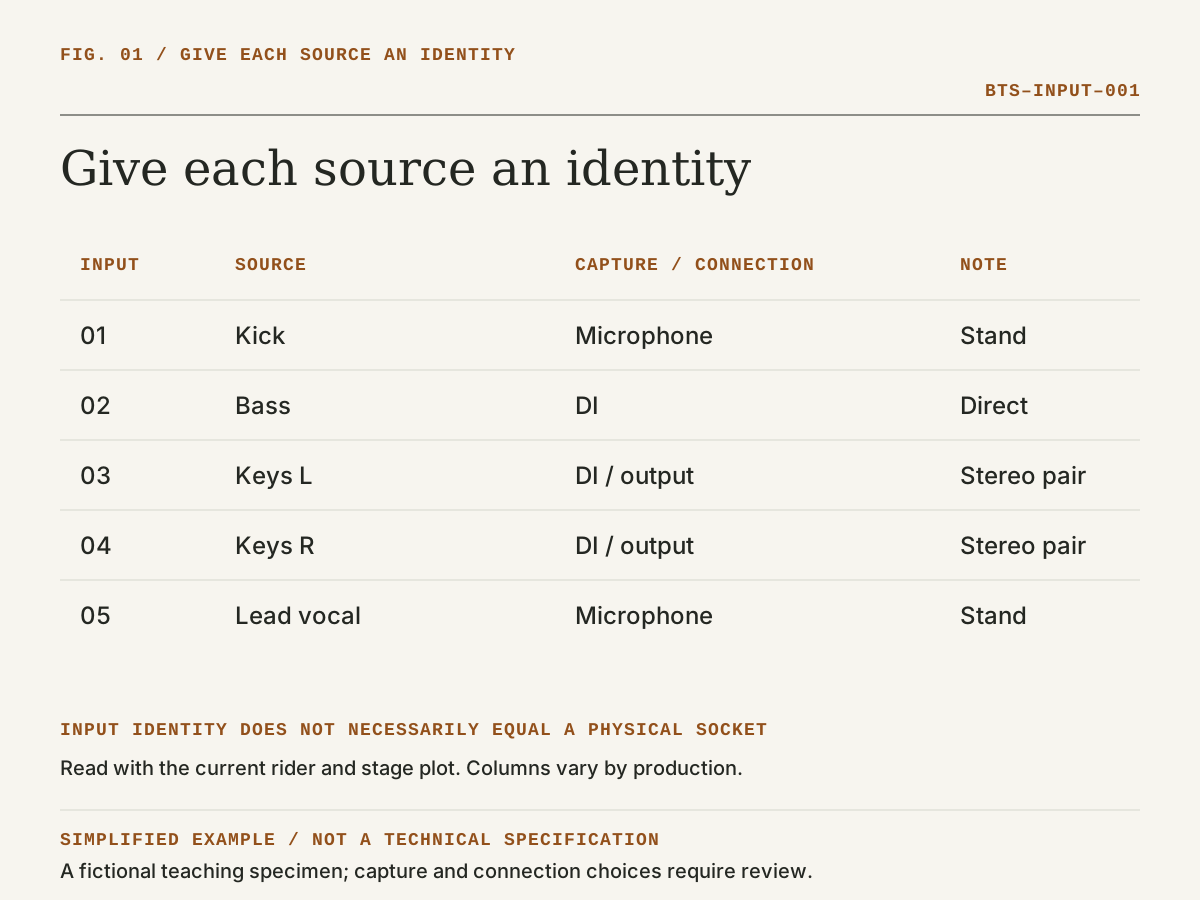
“Kick,” “Lead vocal,” “Keys left,” “Playback right” and “Remote return” describe what the production needs to receive. The team can then establish how each source is captured or connected, where it appears on stage, what supporting equipment it needs and where it is routed.
An input number identifies an entry in the working list. It does not necessarily prescribe one physical socket on every possible system.
Digital stage boxes, console layers, festival patches, splits, broadcast feeds and local workflows can map the same source differently. The document should remain clear about the source even when the physical implementation changes.
What Information Can an Input List Contain?
Depending on the production, a row may include:
- input or channel reference;
- source name;
- performer or instrument;
- microphone, DI or connection method;
- stand or mounting requirement;
- phantom-power or other relevant connection note;
- stage-box, sub-snake or location reference;
- monitor or routing note where useful;
- ownership or supply responsibility;
- comments needed to prepare the source.
No single set of columns is mandatory everywhere. Include the information the receiving production needs, and explain local abbreviations rather than assuming every team uses the same shorthand.
Input Numbers and Channel Order
A consistent order helps people discuss and prepare the list. Inputs may be grouped by drums, percussion, bass, guitars, keyboards, playback, vocals and other sources, but the useful order depends on the show and production workflow.
Changing the order is not automatically wrong. The problem occurs when different teams prepare from different orders without a clear mapping. The stage team, console operator, monitor engineer, recording team and touring party should be able to identify the same source even if their physical systems use different socket numbers.
Microphones and DI Boxes
The input list may identify a preferred microphone, microphone type, DI or connection format where that information affects preparation.
A microphone receives an acoustic source. A typical DI application converts an unbalanced, high-impedance instrument signal into a balanced, low-impedance signal suitable for connection to the audio system. Some electronic sources can connect through other balanced outputs or interfaces.
The listed model may be essential, preferential or simply a useful starting point. If the distinction matters, it should be clarified during advance rather than inferred from the presence of a brand name.
Instruments and Backline
The input list can reveal information that the backline section does not state clearly.
Several tom inputs suggest a particular drum configuration. Separate bass DI and bass-microphone entries suggest two audio paths. Stereo keyboard entries indicate two audio channels even when the equipment list names only one keyboard.
This does not make the input list an authoritative backline inventory. It means the documents should describe the same performance. A mismatch is a question to resolve.
Playback and Electronic Sources
Playback, click, tracks, samplers, computers, electronic drums, keyboards and remote feeds may provide mono, stereo or multiple discrete outputs.
The list should identify what the production expects to receive and any information needed to prepare it. The playback operator, audio team and production coordinator should agree responsibility for devices, interfaces, adapters, redundancy, cueing and file readiness where relevant.
Phantom Power and Other Technical Notes
Some microphones, active DIs and devices require phantom power or another power arrangement. If that requirement is known and useful to preparation, it can be recorded.
Notes should communicate a real requirement, not become a collection of settings copied from an unrelated console file. Gain, processing and routing decisions remain part of the actual system and operator workflow.
Who Prepares the Input List?
It may be prepared by an artist's audio engineer, technical director, production manager, musical director, supplier or another person who understands the performance sources. Responsibility varies.
The receiving audio team should review it. Preparation by an experienced person does not remove the need to reconcile the list with the current rider, stage plot, venue, equipment, supplier scope and show format.
When Should It Be Shared?
Share it early enough for the receiving production to review source count, capture or connection methods, stage infrastructure, console capacity, monitor requirements, staffing and unresolved questions.
The useful lead time depends on the event. A late revision should still be communicated clearly rather than silently replacing the order or source count after preparation has begun.
How the Input List Relates to the Technical Rider
The technical rider communicates the wider production requirement. The input list describes the audio sources within that requirement.
It may sit inside the rider or accompany it. The written rider can explain preferences and responsibilities that do not fit neatly into rows, while the list gives the audio team a structured view of sources.
Input List vs Stage Plot
The input list explains what enters the sound system. The stage plot explains where performers and important equipment are intended to be positioned.
They overlap at useful points: performer identity, instrument position, microphone or DI location and monitor placement. They are not substitutes. A channel list cannot fully explain a physical stage layout, and a drawing cannot reliably communicate every source and connection detail.
What If the Input List Changes?
Update the current version, identify the change and communicate it to the people whose preparation is affected.
An added source can affect stage cabling, input capacity, console layout, monitoring, recording, split systems and soundcheck time. A removed source may also require updated labels and routing so the team does not prepare or operate an obsolete path.
Why the Current Version Matters
Input lists often change as arrangements, performers, touring equipment and show formats develop.
The most detailed list is not useful if it is no longer current. The production should be able to identify which version it is preparing from and reconcile late changes with the approved working plan.
Key Takeaway
An input list gives every audio source a clear identity. The system can then be prepared around the performance that actually needs to be connected.
Related questions
What is an input list?
An input list is a structured list of the audio sources that need to enter a live-sound system, commonly including source identity, input reference, capture or connection method and preparation notes.
What information should an input list contain?
It may contain input reference, source, microphone or connection method, stand, location, power, routing, responsibility and useful notes. The required columns vary by production.
Who prepares an input list?
It may be prepared by an artist engineer, technical director, production manager, musical director, supplier or another person who understands the performance sources.
Is an input list part of a technical rider?
It often is. An input list may appear inside the rider or as a separate companion document describing the audio sources and related channel information.
What is the difference between an input list and a stage plot?
The input list describes audio sources and connections; the stage plot shows intended physical positions. They should be consistent but are not interchangeable.
Does input order matter?
A consistent order helps preparation and communication, but it does not have to match every physical console socket. Clear source identity and mapping matter more than one universal order.
Should microphones and DI boxes be listed on an input list?
List them where the capture or connection method affects preparation. A model may be essential or preferential, so the requirement should be clarified rather than assumed.
What happens if the input list changes?
Update the current version, identify the changes and notify affected teams so stage connections, console preparation, monitoring, recording and soundcheck planning can be revised.
Sources & references
- Tech Specs and Stage PlotsMusicians' Union / technical reference
- Understanding Basic AudioYamaha Corporation of America / manufacturer
- What Is a DI?Radial Engineering / manufacturer